How To Clear Browser Cookies
Here are some steps you can follow in case the login is failing, even though you have the correct login and password.
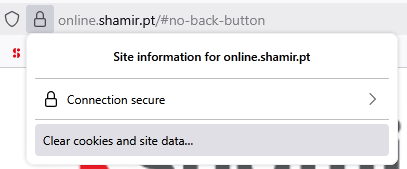
- First, click on the "lock" icon situated to the left of the address and select "Clear Cookies and Site Data":
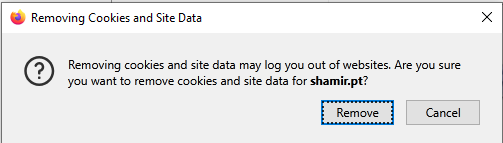
- Then, press "Remove" on the confirmation popup:
- Volver al inicio and check if the problem was solved.
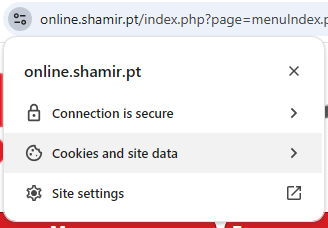
- First, click on the "settings" icon on the left of the address, then choose "Cookies and Site Data":
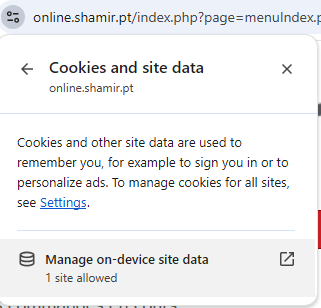
- Different options will appear, where you must select "Manage On-Device Site Data":
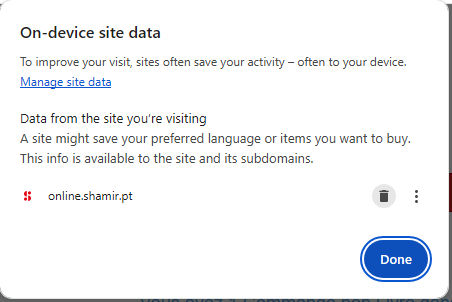
- A new popup will appear, where you must press the "delete" icon, situated to the right of the site address:
- Volver al inicio and check if the problem was solved.
- First, click on the "lock" icon on the left of the address, then choose "Cookies and Site Data":
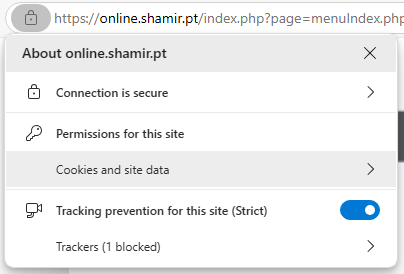
- Different options will appear, where you must select "Cookies (... cookies in use)":
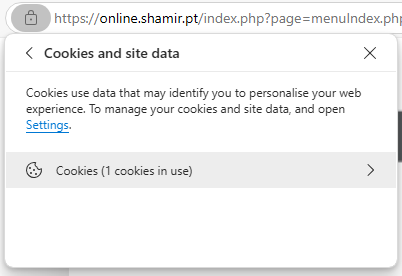
- A new popup will appear, where you must press the line with the "address line":
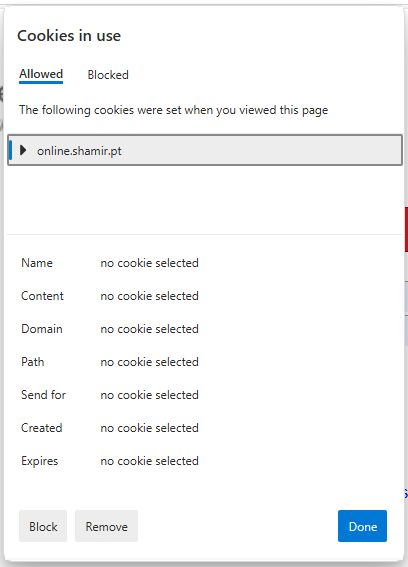
- Finally, press the "Remove" button, situated at the bottom of the popup:
- Volver al inicio and check if the problem was solved.